MSA 1 -- Measurement System Analysis Method 1
The MSA Method 1 (also known as Procedure 1 or Cg/Cgk Study) is used to assess the repeatability of a measurement system based on a single part. It is the simplest and fastest method to verify the basic capability of a measuring instrument.
Overview
Purpose and Application
The MSA 1 answers the question: Is my measuring instrument basically capable of resolving the required tolerance?
A single part (reference part, standard, or master piece) is measured repeatedly -- typically 25 or 50 times. The capability indices Cg and Cgk are calculated from the variation of these repeated measurements.
When is MSA 1 used?
- During initial qualification of a new measuring instrument
- During periodic verification of existing measuring instruments
- For preliminary testing before a more elaborate MSA 2 is conducted
- After repair or calibration of a measuring instrument
Info: MSA 1 evaluates exclusively the repeatability and systematic deviation (Bias) of the measuring instrument. Influences from different operators or parts are not considered -- that is what MSA 2 is for.
Typical Procedure
- Provide a reference part with a known reference value
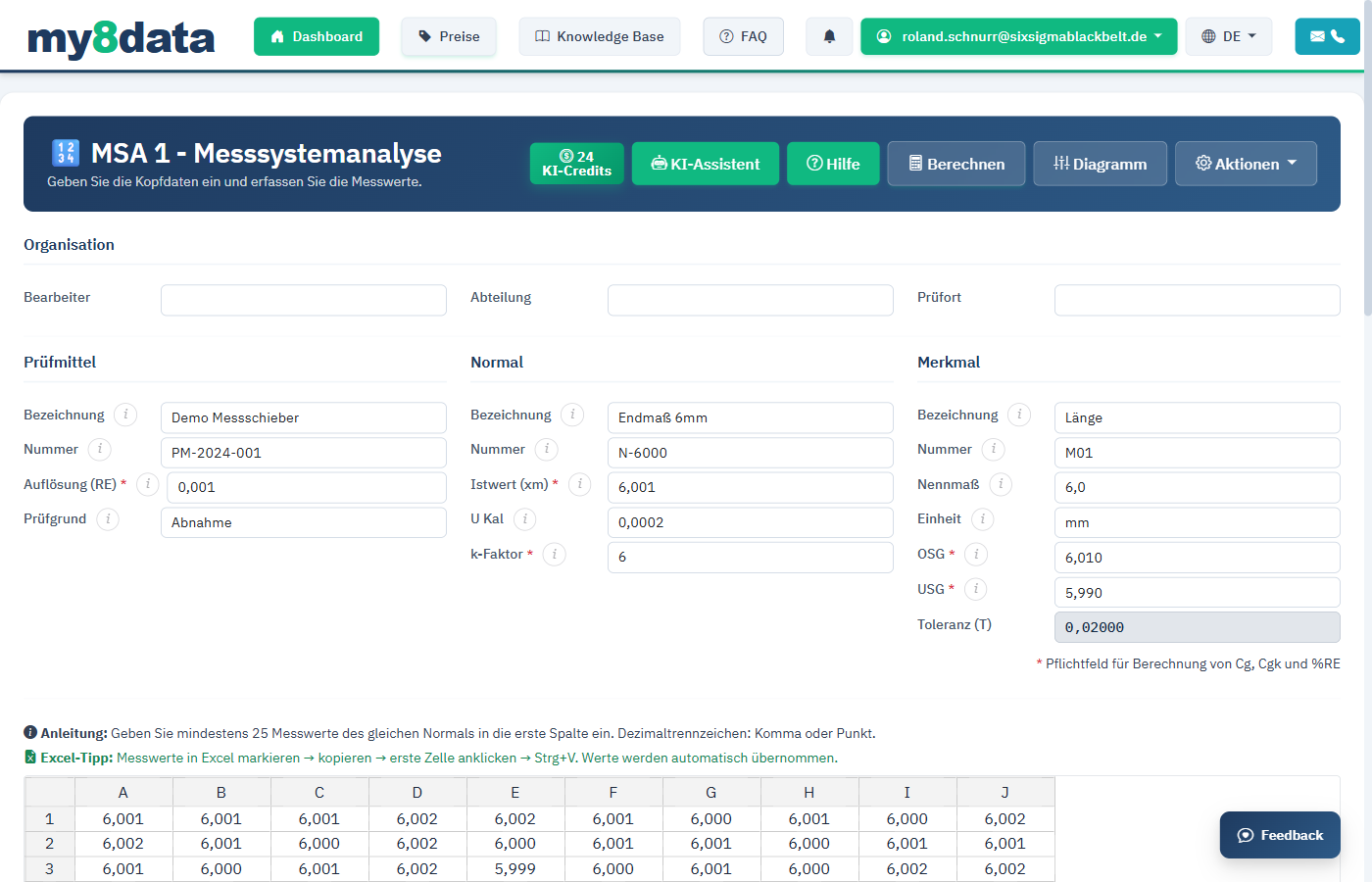
- Enter tolerance limits and reference value in my8data
- Measure the reference part multiple times (minimum 25 measurements recommended)
- Enter measured values in my8data
- Perform calculation and evaluate results
Input
Reference Value and Tolerance
Before you enter the measured values, the following parameters must be defined:
| Field | Description | Example |
|---|---|---|
| Reference Value (xm) | The known true value of the reference part, determined by a more accurate measuring instrument or calibration certificate. | 25.003 mm |
| Upper Tolerance Limit (UTL) | The upper specification limit of the characteristic. | 25.050 mm |
| Lower Tolerance Limit (LTL) | The lower specification limit of the characteristic. | 24.950 mm |
| Tolerance Factor | Portion of tolerance used for evaluation. Standard: 20% (factor 0.2). | 0.2 |
Important: The reference value must have been determined using a superior, more accurate measuring instrument (e.g., coordinate measuring machine, calibrated standard). The accuracy of the reference value should be at least 10 times better than that of the measuring instrument being tested.
Entering Measured Values
The input table holds 50 measured values in 10 columns of 5 rows each. The column headings show which measurements belong in which column: column 1-5 holds measurements 1 to 5, column 6-10 holds measurements 6 to 10, and so on.
- Click on the first cell of column
1-5. - Enter the first measured value and confirm with
EnterorTab. - Fill the column from top to bottom, then continue in the next column.
Alternatively, you can paste measured values from Excel using Ctrl+C / Ctrl+V (see chapter Entering Data). Copy a block in the same shape -- up to 10 columns with 5 values each. A single Excel column with 50 values stacked below each other does not fit the table, because it only has five rows.
Why by column? The run chart plots the measured values in exactly this order and therefore shows the chronological course of your measurement series. The order does not affect the key figures: Cg, Cgk, %RE and the histogram stay the same, no matter which cell a value sits in.
Tip: For a meaningful analysis, at least 25 measurements should be performed. Many standards and guidelines recommend 50 measurements.
Additional Input Fields
Depending on configuration, additional fields may be available:
- Characteristic Description -- Name of the measured characteristic (e.g., "Diameter Hole 3")
- Measuring Instrument -- Designation of the measuring instrument used
- Operator -- Name of the operator
- Date -- Date of measurement
Indices
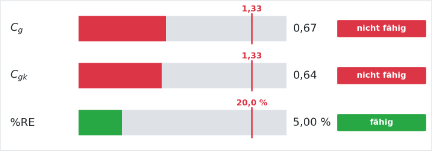
After calculation, the following statistical indices are determined and displayed:
Cg -- Repeatability Capability Index
The Cg value (Capability of the Gauge) describes the repeatability of the measuring instrument in relation to the tolerance. It considers only the variation of the measured values, not the systematic deviation.
Formula:
Cg = (k * T) / (s * sg)
Where:
- k = Tolerance factor (Standard: 0.2, i.e., 20% of tolerance)
- T = Tolerance (UTL - LTL)
- s = Spread factor (Standard: 6 for 99.73% range)
- sg = Standard deviation of measured values
Cgk -- Repeatability Capability Index with Bias
The Cgk value additionally considers the systematic deviation (Bias) of the measuring instrument from the reference value. It is always less than or equal to the Cg value.
Formula:
Cgk = (k * T - |xm - x_quer|) / (s * sg)
Where:
- xm = Reference value
- x_quer = Mean of measured values
%GRR (Percentage of Tolerance)
The %GRR value indicates the percentage share of measuring instrument variation to total tolerance.
Evaluation Criteria
| Index | Evaluation | Meaning |
|---|---|---|
| Cg >= 1.33 | Capable (green) | The measuring instrument is suitable for the required tolerance. |
| 1.00 <= Cg < 1.33 | Conditionally capable (yellow) | The measuring instrument is borderline. Improvements recommended. |
| Cg < 1.00 | Not capable (red) | The measuring instrument is unsuitable. Corrective action required. |
| Cgk >= 1.33 | Capable (green) | Repeatability and bias are acceptable. |
| Cgk < 1.33 | Not capable (red) | Systematic deviation and/or variation too large. |
Tip: If the Cg value is good but the Cgk value is poor, a systematic deviation (Bias) is present. In this case, the measuring instrument should be recalibrated.
Info: The threshold values may vary depending on industry standard. In the automotive industry, threshold values of 1.33 according to VDA 5 or AIAG are frequently used.
Diagrams
The MSA 1 in my8data generates two central diagrams for visual evaluation of the measurement system.
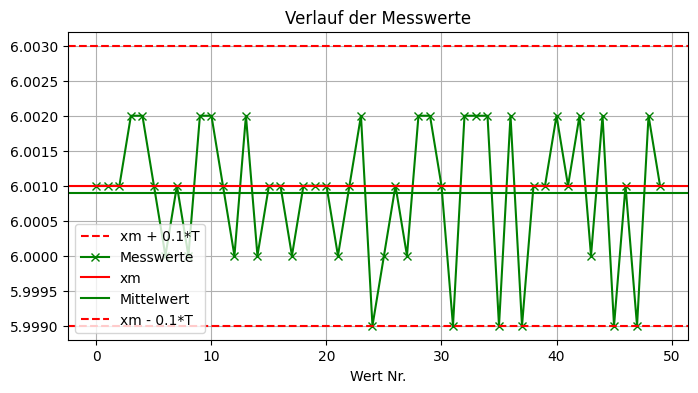
Run Chart
The run chart shows the individual measured values in the order they were recorded:
- X-axis: Measurement No. (1, 2, 3, ...)
- Y-axis: Measured value
- Red horizontal line: Reference value (xm)
- Blue horizontal lines: Upper and lower tolerance limits (based on tolerance portion)
- Green points: Individual measured values
The run chart helps you identify the following patterns:
- Trend: Systematic drift of the measuring instrument over time (e.g., due to heating).
- Jumps: Sudden changes indicating external influences.
- Uniform Variation: Measured values should vary randomly around the reference value.
Warning: If you observe a clear trend in the run chart, the assumption of stable measurement is violated. Investigate possible causes (e.g., thermal influences, wear) before interpreting the results.
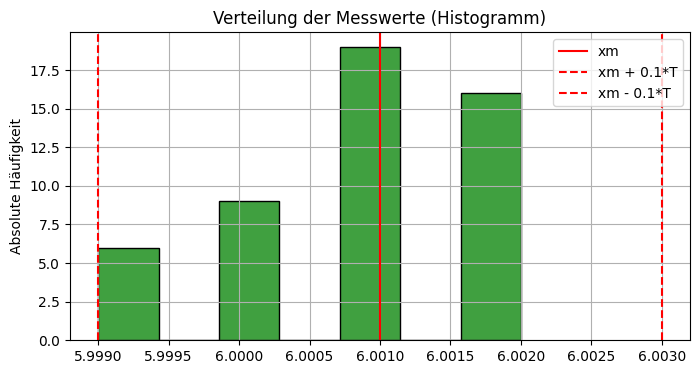
Histogram
The histogram shows the distribution of measured values:
- X-axis: Measured value ranges (classes)
- Y-axis: Frequency
- Red vertical line: Reference value
- Blue vertical lines: Tolerance limits (based on tolerance portion)
- Bell-shaped curve: Normal distribution fit
The histogram allows you to:
- Assess the symmetry of the distribution (ideally bell-shaped and symmetric around the reference value).
- Visually estimate the width of variation relative to tolerance.
- Identify outliers or multiple peaks that could indicate measurement problems.
Tip: A histogram with clear shift relative to the reference value indicates a systematic deviation (Bias). This is also reflected in a lower Cgk value.