
MSA 3 — Procedure 3 (Automated Measurement Systems)
MSA 3 is an MSA 2 for automated measurement systems, e.g., coordinate measuring machines (CMM), optical measuring machines, or measurement robots. Since automated measurement systems are not affected by different operators, only one operator (the measuring device itself) is required. Instead, the focus is on the repeatability (Equipment Variation) of the measurement system over a larger sample.
Overview
Purpose and Application
MSA 3 is used when the measurement system operates automatically and the operator has little or no influence on the measurement result. Typical applications:
- Coordinate Measuring Machines (CMM) — CNC-controlled 3D measuring devices
- Optical Measuring Machines — Camera systems, laser measurement
- Measurement Robots — Automated inline measurement stations
- Automated Test Stands — Series-accompanying measurement equipment
Since comparability between operators (AV) is not relevant for these systems, this variance component is eliminated. The analysis focuses entirely on the repeatability (EV) of the measurement system.
Distinction from MSA 2
| Property | MSA 2 | MSA 3 |
|---|---|---|
| Application | Manual measurement systems with multiple operators | Automated measurement systems (measuring machines) |
| Operators | 3 operators | 1 operator (Automat) |
| Parts | 10 parts | 25 parts |
| Measurements per part | 3 measurements × 3 operators = 9 | 6 measurements × 1 operator = 6 |
| Variance components | EV + AV + Interaction | EV only (no AV, no interaction) |
| Focus | Repeatability + Reproducibility | Repeatability only |
| ANOVA model | Part + Operator + Part×Operator + Residuals | Part + Residuals (simplified) |
Typical Workflow
- Select 25 parts that cover the tolerance range
- Establish reference values and tolerance limits
- Measure each part 6 times with the automated measurement system
- Enter measurement data in my8data
- Execute calculation and evaluate key figures
Info: MSA 3 uses 25 parts instead of 10 (as in MSA 2) because automated systems can efficiently process larger samples, and this increases the statistical validity of the repeatability assessment.
Input
Master Data
Before entering data, define the master data:
| Field | Description | Note |
|---|---|---|
| Operator | Designation of the measurement system / measuring machine | e.g., "CMM-001" or "Zeiss Contura" |
| Reference Value | Known true value of the characteristic | Must be determined by higher-order measuring equipment |
| Upper Tolerance Limit (USL) | Upper specification limit | According to drawing |
| Lower Tolerance Limit (LSL) | Lower specification limit | According to drawing |
Info: In the "Operator" field for MSA 3, enter the designation of the automated measurement system — not the name of an operator, since there is only one "operator" (the machine).
Entering Measurement Data
The data table has 6 columns (Measurement 1 through Measurement 6) and 25 rows (parts):
| Column | Description |
|---|---|
| Measurement 1 | First measurement of each part |
| Measurement 2 | Second measurement of each part |
| Measurement 3 | Third measurement of each part |
| Measurement 4 | Fourth measurement of each part |
| Measurement 5 | Fifth measurement of each part |
| Measurement 6 | Sixth measurement of each part |
Each row corresponds to one part. All 25 parts are measured 6 times each.
Tip: The table allows insertion of additional rows if more than 25 parts are to be measured. Use Copy & Paste (
Ctrl+C/Ctrl+V) to transfer measurement data from Excel.
Warning: Ensure that all measurements are performed under identical conditions (same setup, same measurement program, same environmental conditions). Only then can the repeatability of the measurement system be assessed correctly.
Notes on Test Execution
- Identical measurement conditions: All measurements should be performed with the same measurement program and the same settings.
- Randomization: Measure the parts in random order to detect systematic drift effects.
- Setup: Each part must be re-clamped for each repeat measurement to reflect the actual measurement process.
Key Figures
Variance Components
Since MSA 3 involves only one operator (the measuring machine), the variance decomposition is simplified:
| Variance Component | Description | MSA 3 |
|---|---|---|
| EV (Equipment Variation) | Scatter caused by the measuring device (repeatability) | Calculated — main key figure |
| AV (Appraiser Variation) | Scatter caused by different operators (reproducibility) | Eliminated (always 0) — only 1 operator |
| Interaction (Part × Operator) | Interaction between part and operator | Eliminated — only 1 operator |
| PV (Part Variation) | Scatter between parts | Calculated |
| GRR | Total measurement system scatter | = EV (since AV = 0) |
ANOVA Results
The ANOVA of MSA 3 uses a simplified model without operator and interaction effects:
| Source | Description |
|---|---|
| Part | Variance component due to differences between the 25 parts |
| Residuals | Variance component due to repeat measurements (= Equipment Variation) |
Info: Compared to MSA 2, the rows "Operator" and "Part × Operator" are eliminated from the ANOVA table. The ANOVA model is thus simpler and more directly interpretable.
Key Figure Overview
| Key Figure | Description | Evaluation |
|---|---|---|
| %EV | Proportion of device scatter relative to tolerance | The smaller, the better |
| %GRR | Total proportion of measurement system scatter (= %EV in MSA 3) | ≤ 10 %: capable, 10–30 %: conditionally capable, > 30 %: incapable |
| %PV | Proportion of part scatter | Should account for the largest proportion |
| ndc | Number of distinguishable categories | ≥ 5: sufficient |
Evaluation Criteria
| Evaluation Range | Criterion | Action |
|---|---|---|
| %GRR ≤ 10 % | Measurement system capable | Measurement system is suitable for the intended purpose |
| 10 % < %GRR ≤ 30 % | Conditionally capable | Improvements recommended — optimize measurement program, check setup |
| %GRR > 30 % | Incapable | Check measurement system, calibrate, or replace |
Overall Assessment of the Measurement System
The "Measurement System Evaluation" field summarizes the result in a single judgment. The evaluation logic proceeds in two stages:
Stage 1 – %GRR (Tolerance):
| Evaluation | Condition |
|---|---|
| capable | %GRR ≤ "capable up to" threshold (standard: 10 %) |
| conditionally capable | %GRR ≤ "conditionally capable up to" threshold (standard: 30 %) |
| incapable | %GRR > "conditionally capable up to" threshold |
Stage 2 – NDC (optional):
If the "ndc ≥" field is set with a minimum value, the ndc is used as an additional criterion. Both conditions must then be satisfied simultaneously (AND logic):
- %GRR threshold met and ndc ≥ minimum value → Evaluation as per Stage 1
- ndc < minimum value → Evaluation incapable, regardless of %GRR value
If the "ndc ≥" field is empty, the ndc does not flow into the overall evaluation — but it is still calculated and displayed.
Example: %GRR = 7.74 % (≤ 10 %, thus "capable") and ndc = 4, minimum ndc = 5 → Evaluation incapable, because the ndc requirement is not met.
Diagrams
MSA 3 provides two diagrams:
- Boxplot by Parts — Shows the scatter of 6 measurements per part. Helps identify whether certain parts scatter more than others.
- GRR Evaluation Diagram — Bar chart showing variance components (EV, PV) with color-coded evaluation.
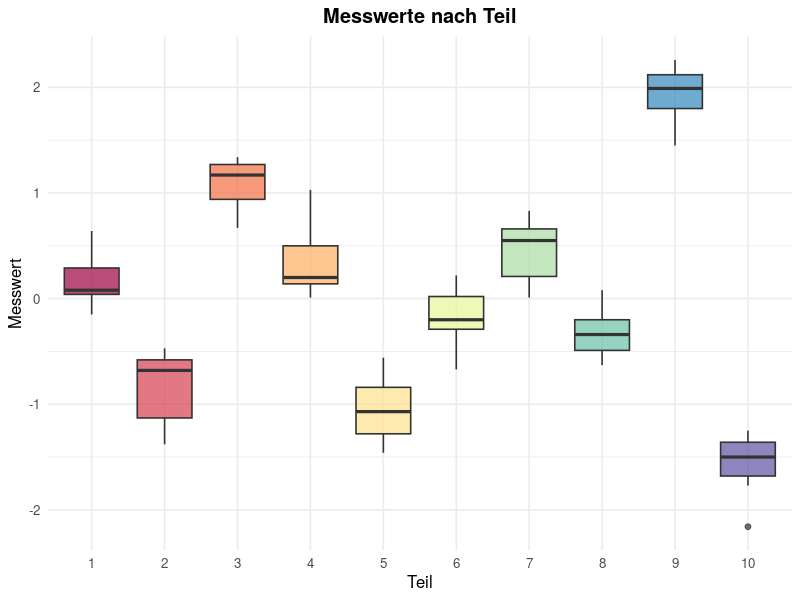
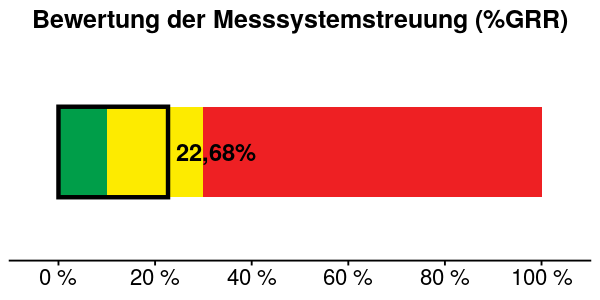
Info: Compared to MSA 2, the "Interaction Plot" and "Boxplot by Operator" diagrams are missing, as these are not meaningful with only one operator.
Tip: If repeatability (EV) is too high, check the following possible causes: probe wear, inaccurate setup, temperature fluctuations, vibrations, or outdated measurement program.