
Machine Capability Study (MFU)
Overview
The Machine Capability Study (MFU) is a central tool in quality assurance that evaluates the ability of a machine or manufacturing process to produce parts within specified tolerance limits. In contrast to process capability studies (SPC/Ppk), the MFU examines exclusively the short-term variation of a machine under controlled conditions.
The MFU is typically performed:
- When acquiring a new machine (acceptance test)
- After maintenance or repair
- When relocating a machine to a new location
- During periodic reviews as part of preventive maintenance
Info: The MFU measures the inherent capability of the machine itself, without influences such as tool wear, material changes, or operator effects. To evaluate the entire process, use the Process Capability Analysis (Ppk).
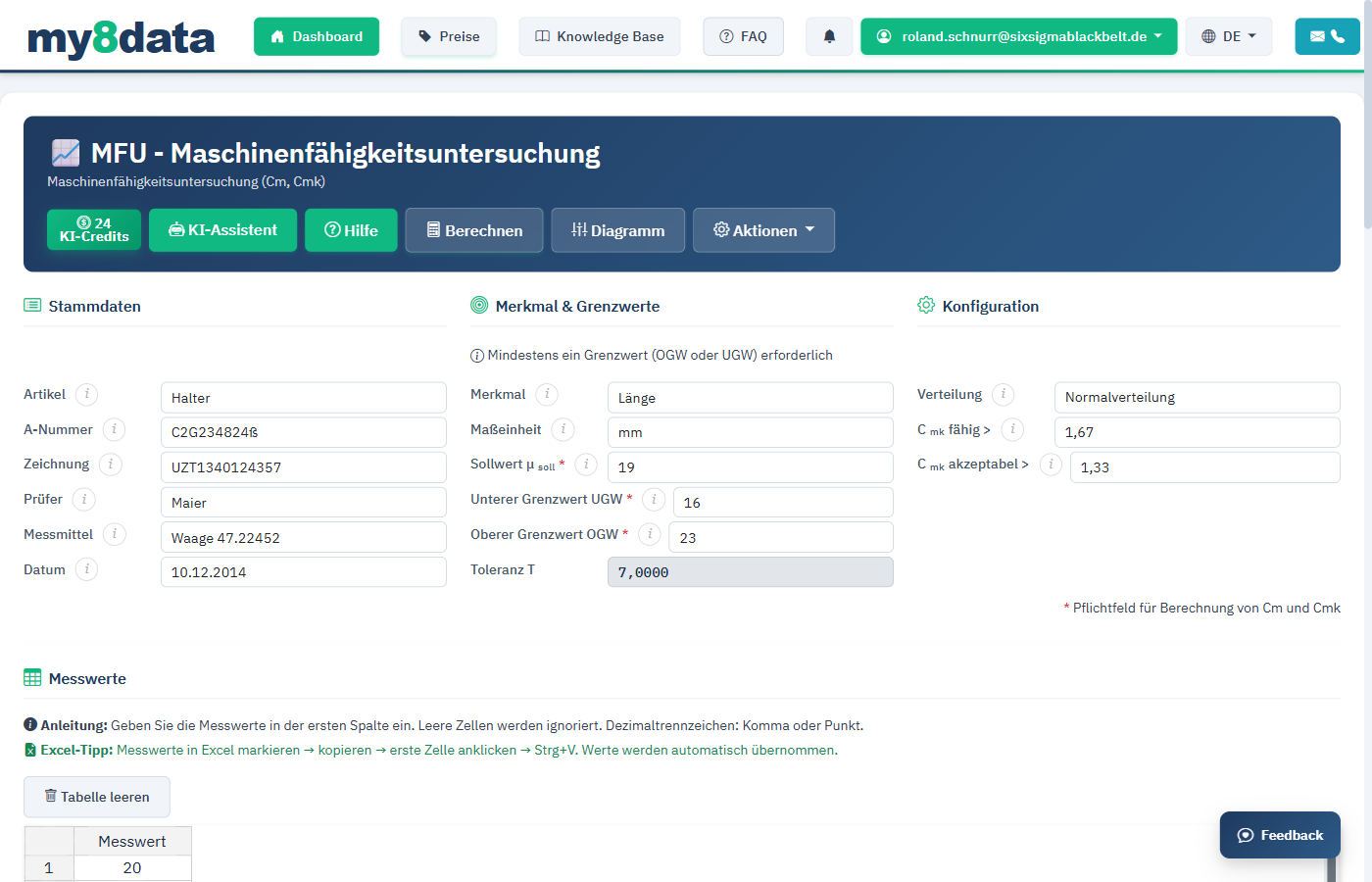
Typical Procedure
- Set up the machine under stable conditions (same operator, same material, same environment)
- Produce at least 50 consecutive parts (recommended: 50 to 100 parts)
- Measure all parts and enter the measured values in my8data
- Define tolerance limits (USL/LSL) and, if applicable, the target value
- Perform the analysis and evaluate the capability indices
Overview of Capability Indices
| Index | Designation | Minimum Requirement | Meaning |
|---|---|---|---|
| Cm | Machine Capability Index | >= 1.67 | Ratio of tolerance width to process variation |
| Cmk | Critical Machine Capability Index | >= 1.67 | Also considers the location of the mean |
Warning: A high Cm value alone is not sufficient. Only when Cmk also reaches the threshold is it ensured that the process both has sufficiently narrow variation and is centered within the tolerance.
Data Entry and Specifications
Enter Measured Values
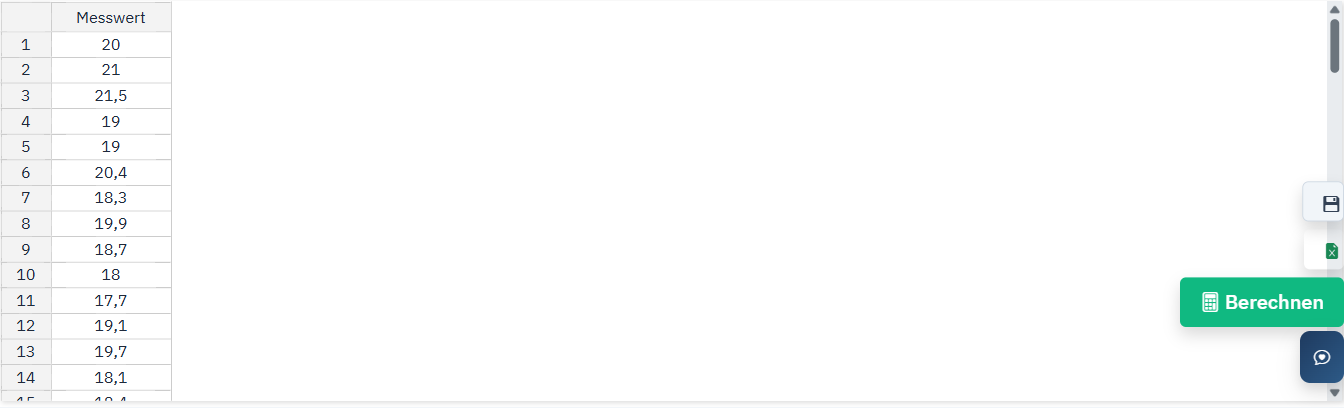
In my8data, you have several options to capture your measurement data for the MFU:
- Manual Entry: Enter the measured values directly into the input table. Use the Tab key to quickly move between fields.
- Import from Excel/CSV: Upload a prepared file with your measured values. The data is automatically recognized and imported.
- Clipboard (Copy & Paste): Copy measured values from any source and paste them into the input field.
Define Specification Limits
To calculate machine capability, you must define the specification limits (tolerance limits):
| Field | Description | Example |
|---|---|---|
| USL (Upper Specification Limit) | Maximum allowable value | 10.05 mm |
| LSL (Lower Specification Limit) | Minimum allowable value | 9.95 mm |
| Target Value (optional) | Nominal target value | 10.00 mm |
Tip: If you have only a one-sided tolerance (e.g., only a maximum), leave the corresponding field empty. The calculation will then determine only the one-sided capability index.
Sample Size
For a meaningful MFU, the sample size should be at least n = 50. The following table shows recommended sample sizes:
| Sample Size | Suitability | Remark |
|---|---|---|
| n < 30 | Not recommended | Insufficient statistical validity |
| n = 50 | Standard | Common minimum requirement per VDA/AIAG |
| n = 100 | Recommended | Higher statistical confidence |
| n > 100 | Very good | Particularly useful for critical characteristics |
Info: According to VDA Volume 5 and AIAG SPC Reference Handbook, a sample size of at least 50 parts is recommended for machine capability studies.
Capability Indices Cm and Cmk
Machine Capability Index Cm
The Cm value (Machine Capability Index) describes the ratio of tolerance width to the measured variation of the machine. It indicates how much space the process has within the tolerance, regardless of where the mean is located.
Formula:
Cm = (USL - LSL) / (6 * s)
Where:
- USL: Upper Specification Limit
- LSL: Lower Specification Limit
- s: Standard deviation of the sample
A Cm value of 1.00 means that the process variation (6s) exactly equals the tolerance width. In practice, significantly higher values are required.
Critical Machine Capability Index Cmk
The Cmk value (Critical Machine Capability Index) considers both the variation and the location of the mean relative to the tolerance center. It is always less than or equal to the Cm value.
Formula:
Cmk = min((USL - x̄) / (3 * s), (x̄ - LSL) / (3 * s))
Where:
- x̄: Arithmetic mean of the sample
- The smaller of the two values is decisive
Evaluation of Capability Indices
| Range | Cm | Cmk | Assessment |
|---|---|---|---|
| Capable | >= 1.67 | >= 1.67 | Machine is capable; process can be approved |
| Conditionally capable | 1.33 - 1.66 | 1.33 - 1.66 | Machine conditionally capable; improvements recommended |
| Not capable | < 1.33 | < 1.33 | Machine not capable; action required |
Tip: If Cm differs significantly from Cmk, this indicates that while the machine has sufficiently narrow variation, the mean is not centered. In this case, a simple adjustment of the machine setting can often help.
Sample and Uncertainty
The calculated capability indices are based on a sample and are therefore subject to statistical uncertainty. my8data reports Cm and Cmk as point estimates; confidence intervals are not calculated.
Info: The larger the sample, the lower the uncertainty of the index. If Cmk is just above the limit, a larger sample is worthwhile.
Distribution Analysis
Normality Test
A fundamental prerequisite for the calculation of Cm and Cmk is that the measured values are normally distributed. my8data automatically performs a normality test to verify this assumption.
The Anderson-Darling test is used. It compares the sample with a normal distribution and gives particular weight to the tails, exactly the areas that matter for capability at the tolerance limits. The result reads normally distributed (p-value > 0.05) or not normally distributed.
Warning: If the normality test shows a significant deviation from the normal distribution (p-value < 0.05), the calculated Cm/Cmk values should be interpreted with caution. In such cases, data transformation or the use of alternative distribution models may be necessary.
Histogram
The histogram displays the distribution of measured values graphically. It shows how frequently certain measurement value ranges occur and enables a visual assessment of the distribution.
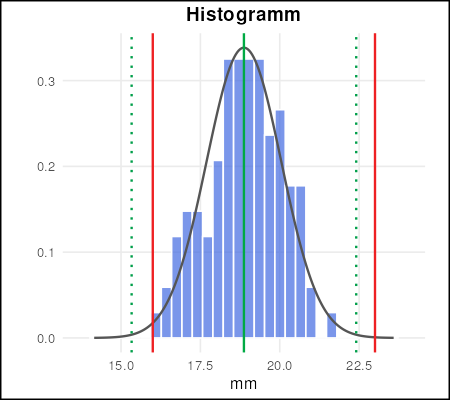
The histogram displays the following elements:
- Bars: Frequency of measured values per class
- Normal distribution curve: Theoretical normal distribution based on mean and standard deviation
- Specification limits: Red vertical lines at USL and LSL
- Mean: Green vertical line at the arithmetic mean
Probability Plot
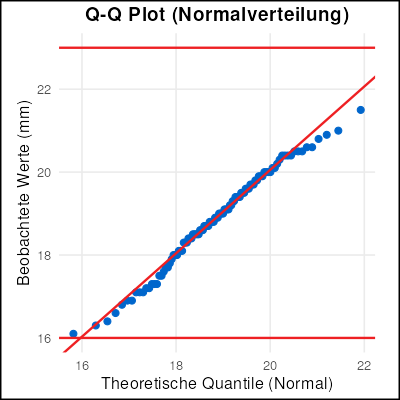
In the probability plot (Normal Probability Plot), the measured values are plotted against the expected quantiles of the normal distribution. If the points lie approximately on a straight line, this indicates a normal distribution.
Interpretation of Distribution Analysis
| Observation | Possible Cause | Recommended Action |
|---|---|---|
| Skewed distribution | Tool wear, one-sided load | Identify and eliminate cause |
| Bimodal distribution | Mixture of two populations (e.g., two tools) | Separate and analyze data separately |
| Outliers | Measurement error, material defect | Check outliers and remove if necessary |
| Wide distribution | High machine variation | Maintain or adjust machine |
Tip: Use the distribution analysis not only to validate the normality assumption, but also as a diagnostic tool to identify potential problems early.
Folded Normal Distribution
When This Distribution Applies
Cm and Cmk assume normally distributed measured values. For an entire group of characteristics this assumption is violated in principle — namely wherever the characteristic cannot fall below zero and the ideal value is exactly zero:
| Characteristic | Ideal value | Why not normally distributed |
|---|---|---|
| Runout | 0 | A negative runout does not exist |
| Flatness | 0 | Deviation from the plane is always positive |
| Position | 0 | The distance from the nominal position is an absolute value |
| Unbalance | 0 | A magnitude without sign |
Such characteristics pile up against the zero boundary and trail off flatly towards higher values. Fitting a normal distribution over them yields incorrect indices and predicts scrap below zero, which cannot occur.
For these cases, select Folded normal distribution in the Distribution field.
How the Distribution Arises
Behind the characteristic lies an ordinary normal distribution — the sign is simply discarded during measurement. A runout of −0.03 mm and one of +0.03 mm both yield the measured value 0.03 mm.
Visually: the normal distribution is folded at zero, the left half flips onto the right. Hence the name.
This also explains the most important peculiarity of this distribution: its two parameters μ and σ do not describe the measured values, but the hidden normal distribution behind them that would have been measured without the folding.
Formulas of the Distribution
Density (PDF)     f(x) = (1/σ) · [ φ((x − μ)/σ) + φ((x + μ)/σ) ]

Distribution(CDF) F(x) = Φ((x − μ)/σ) + Φ((x + μ)/σ) − 1

Mean              E[X] = σ · √(2/π) · exp(−μ² / (2σ²)) + μ · [1 − 2 · Φ(−μ/σ)]

Std. deviation    SD[X] = √( μ² + σ² − E[X]² )
Where:
- φ: density of the standard normal distribution
- Φ: distribution function of the standard normal distribution
- μ: location parameter of the underlying normal distribution
- σ: scale parameter of the underlying normal distribution
- x: measured value, always ≥ 0
Info: These four formulas match, character for character, the definition Minitab publishes under Methods and Formulas → Folded normal distribution (Nonnormal Capability Sixpack, support.minitab.com). Both computation paths were checked numerically against each other — details in the Validation section.
Reading the Parameters μ and σ
The most common misconception with this distribution: μ is not the mean of your measured values.
| Quantity | Meaning |
|---|---|
| x̄, s | Mean and standard deviation of the magnitudes actually measured — shown in the descriptive statistics |
| μ, σ | Parameters of the hidden normal distribution before folding — shown under Distribution-specific data |
An example: with μ = 13.64 and σ = 8.43, the mean of the magnitudes is 14.01. The two values diverge because the folded left half pushes the measured values upwards.
Since the magnitude is symmetric in μ, both μ and −μ describe the same distribution. my8data therefore always reports μ as positive — the convention μ ≥ 0 from Leone, Nelson and Nottingham (1961).
How the Parameters Are Estimated
my8data uses the method of moments: it seeks the μ and σ for which the theoretical mean and the theoretical standard deviation of the distribution match exactly the observed mean and the observed standard deviation of your sample.
E[X](μ, σ) = x̄ and SD[X](μ, σ) = s
This is a system of two equations in two unknowns, solved numerically.
When the Method of Moments Has No Solution
This system is not always solvable, and that is not a shortcoming of the software but a property of the method.
The reason: with this distribution the ratio E[X] / SD[X] cannot fall below a minimum value. That minimum is reached at μ = 0 — the case in which the distribution is centred exactly on zero:
E[X] / SD[X] ≥ √(2/π) / √(1 − 2/π) = 1.3236
If your observed ratio x̄ / s falls below it, no pair of parameters can match both moments. The original table in Leone et al. (1961) ends at this very limit.
In this case my8data displays a notice above the results:
Warning: Z̄/s is below 1.3236 – the method of moments has no solution for this data. The parameters are an approximation (mu ≈ 0), so the indices are correspondingly uncertain.
What this means in practice: the reported indices are arithmetically traceable, but they rest on the best possible approximation to an unsolvable system rather than on an actual solution. For characteristics genuinely centred on zero, this occurs in roughly half of all samples.
What you can do:
| Situation | Recommendation |
|---|---|
| Warning appears and the index is reported | Carry the caveat into the report, do not pass over it silently |
| Characteristic is clearly centred on zero | Check whether a Weibull distribution describes the data better |
| Small sample | Increase the size — the ratio x̄/s fluctuates strongly with few values |
Indices Cmo, Cmu and Cmk
For non-normally distributed characteristics, the variation can no longer be described by 6s. my8data therefore uses the quantile method M2,1 of ISO 22514-2: instead of multiples of the standard deviation, it works with the quantiles of the fitted distribution.
Cmo = (USL − X50%)  / (X99.865% − X50%)

Cmu = (X50% − LSL)  / (X50% − X0.135%)

Cmk = min(Cmo, Cmu)
Where:
- X0.135%, X50%, X99.865%: quantiles of the fitted folded normal distribution
- X50%: median of the distribution, taking the place of the mean
- For a normal distribution, the span X99.865% − X0.135% equals exactly 6s
All three quantiles are shown under Distribution-specific data, so every index can be recalculated.
Info: Each side is formed from its own half of the distribution — above, the span X99.865% − X50%; below, the span X50% − X0.135%. For a normal distribution both halves are equal; the folded normal, by contrast, is right-skewed, its upper half being wider than its lower one. Using a shared span for both sides would make the lower index come out systematically too favourable.
Lower Limit: An Empty Field Is Not Zero
For characteristics bounded at zero, the LSL field is normally left empty, because there is no meaningful lower limit. Only the upper side is then evaluated:
- Cmu is not reported
- Cmk equals Cmo
- The calculated performance towards the bottom is 0 ppm
An empty LSL field is expressly something other than LSL = 0. Entering a lower limit of zero formally produces a Cmu — but one that merely measures the distance from the median to the zero boundary and often falls below Cmo. It would then determine Cmk without representing any real requirement. Enter a lower limit only if the drawing actually calls for one.
Cm Only With a Two-Sided Tolerance
In the normal case — upper limit set, LSL empty — the Cm field remains empty. The index compares the tolerance width with the spread width and needs both limits to do so; without a lower limit there is no tolerance width. Cmk alone is then meaningful.
If, exceptionally, both limits are set, Cm is formed using the same quantile method:
Cm = (USL − LSL) / (X99.865% − X0.135%)
The denominator is the 99.73% span of the fitted distribution — exactly 6s for a normal distribution. This form requires no tolerance midpoint, so the skewness of the distribution does not stand in its way.
Calculated and Observed Performance
The calculated performance in ppm follows directly from the fitted distribution:
ppm above  = (1 − F(USL)) × 1,000,000

ppm below  = F(LSL) × 1,000,000        (only when LSL > 0, otherwise 0 ppm)
The observed performance, by contrast, simply counts how many of your measured values lie outside the limits.
Tip: Always compare the two figures. If they diverge widely, the distribution model does not describe the tails of your data well — and it is precisely the tails that determine the index.
Limits of the Model
The folded normal distribution is a model, not a depiction of reality. How far the two can diverge is shown by the historical data set of Leone et al. (1961) with 497 measured wire cambers, which my8data uses for validation:
| Side | Calculated | Observed |
|---|---|---|
| Above USL = 40 | 878 ppm | 4,024 ppm (2 of 497) |
| Below LSL = 2 | 51,857 ppm | 24,145 ppm (12 of 497) |
Here the model understates the upper tail and overstates the lower one. Both are arithmetically correct and nevertheless a warning sign: the distribution fits this data only approximately.
Always check the histogram and the probability plot as well before passing an index on. An index from a poorly fitting distribution is precisely calculated and still misleading.
Validation
The implementation is secured against three independent sources:
| Check | Source |
|---|---|
| Distribution formulas (density, distribution function, mean, standard deviation) | Minitab, Methods and Formulas → Folded normal distribution (support.minitab.com) |
| Parameter estimation of μ and σ | Leone, Nelson, Nottingham: The Folded Normal Distribution, Technometrics Vol. 3 No. 4 (1961), Table 3, DOI 10.1080/00401706.1961.10489974 |
| Index formation Cm, Cmo, Cmu, Cmk | ISO 22514-2, quantile method M2,1 |
Result of the formula cross-check (as of 2026-08-23): the four formulas were checked character by character against the Minitab documentation and additionally recomputed. Across six support points spanning the whole range, the density differs by at most 3.2·10⁻¹³; the ppm values agree exactly.
What Minitab does not define there: the page defines the distribution only. Neither an estimation procedure for μ and σ nor formulas for capability indices are published there — for those, Leone et al. (1961) remains authoritative for the method of moments and ISO 22514-2 for the quantile method.
Reference data sets: three data sets verify the chain automatically on every change to the calculation core — the parameter estimation against the published values, Cmk for a one-sided tolerance, and Cm/Cmu/Cmk for a two-sided one. All three are listed in the validation report with target and actual values.