
MSA 7 -- Attributive Measurement System Analysis
The MSA Method 7 is the attributive measurement system analysis and serves to evaluate measurement systems in which characteristics are not assessed metrically (as numerical values), but attributively (as a category) -- for example "good/bad", "OK/NOK" or according to a rating scale.
Overview
Purpose and Field of Application
The attributive MSA answers the question: Are the inspectors able to assess parts consistently and in agreement when no metric measurement values are available?
Typical applications:
- Visual inspections -- surface quality, color deviations, scratches, dents
- Functional tests -- Good/Bad decisions (e.g., go/no-go gauge testing)
- Subjective assessments -- smell, haptics, acoustic testing
- Sorting inspections -- classification into multiple quality levels
Experimental Design
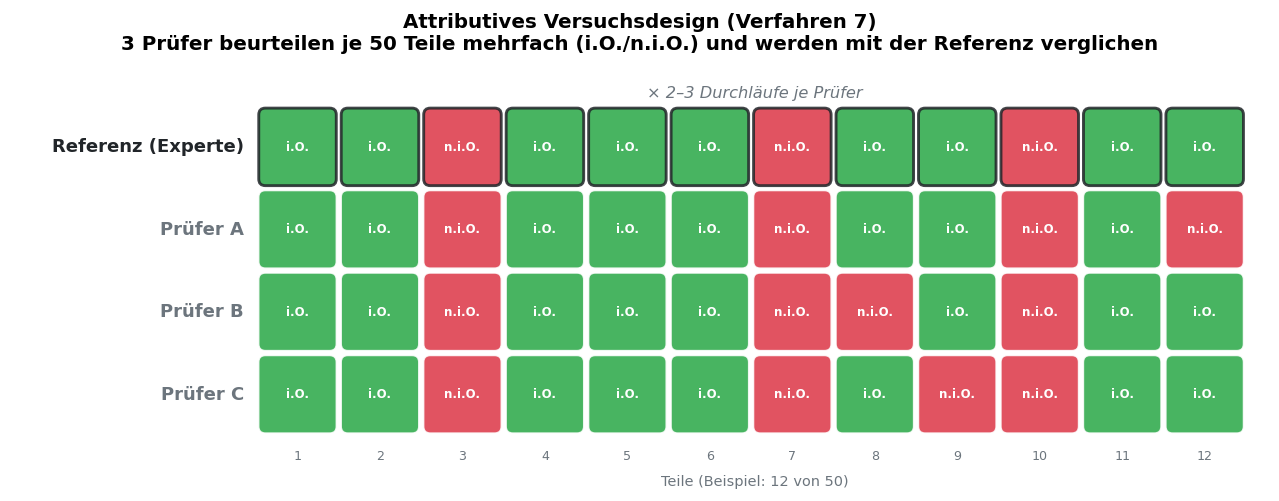
For attributive MSA, the following basic experimental setup applies:
- A selection of parts is assembled. The parts should include both clearly good and clearly bad parts as well as borderline cases.
- Each inspector evaluates each part multiple times (at least 2 runs, 3 recommended).
- The assessments are conducted blinded -- the inspectors know neither the "correct" answer (reference assessment) nor the assessments of the other inspectors.
- Optionally, a reference assessment (master decision) is established for each part, against which the inspector assessments are compared.
| Parameter | Recommendation |
|---|---|
| Number of parts | At least 20, ideally 50 |
| Number of inspectors | At least 2, recommended 3 |
| Number of runs | At least 2, recommended 3 |
| Proportion of borderline cases | Approx. 30--50 % of parts |
| Reference assessment | Recommended (established by experts or specification) |
Important: The quality of an attributive MSA depends significantly on the part selection. If only clearly good and clearly bad parts are used, the study will overestimate the capability of the inspection process. Be sure to include sufficient borderline cases.
Input
Configuration
Before entering data, establish the experimental parameters:
| Field | Description |
|---|---|
| Assessment categories | The possible assessments (e.g. "OK" / "NOK" or "1" / "2" / "3") |
| Number of inspectors | How many inspectors participate in the study |
| Number of parts | How many parts are assessed |
| Number of runs | How many times each inspector assesses each part |
| Reference assessment | Optional "correct" assessment for each part (master decision) |
Enter Assessments
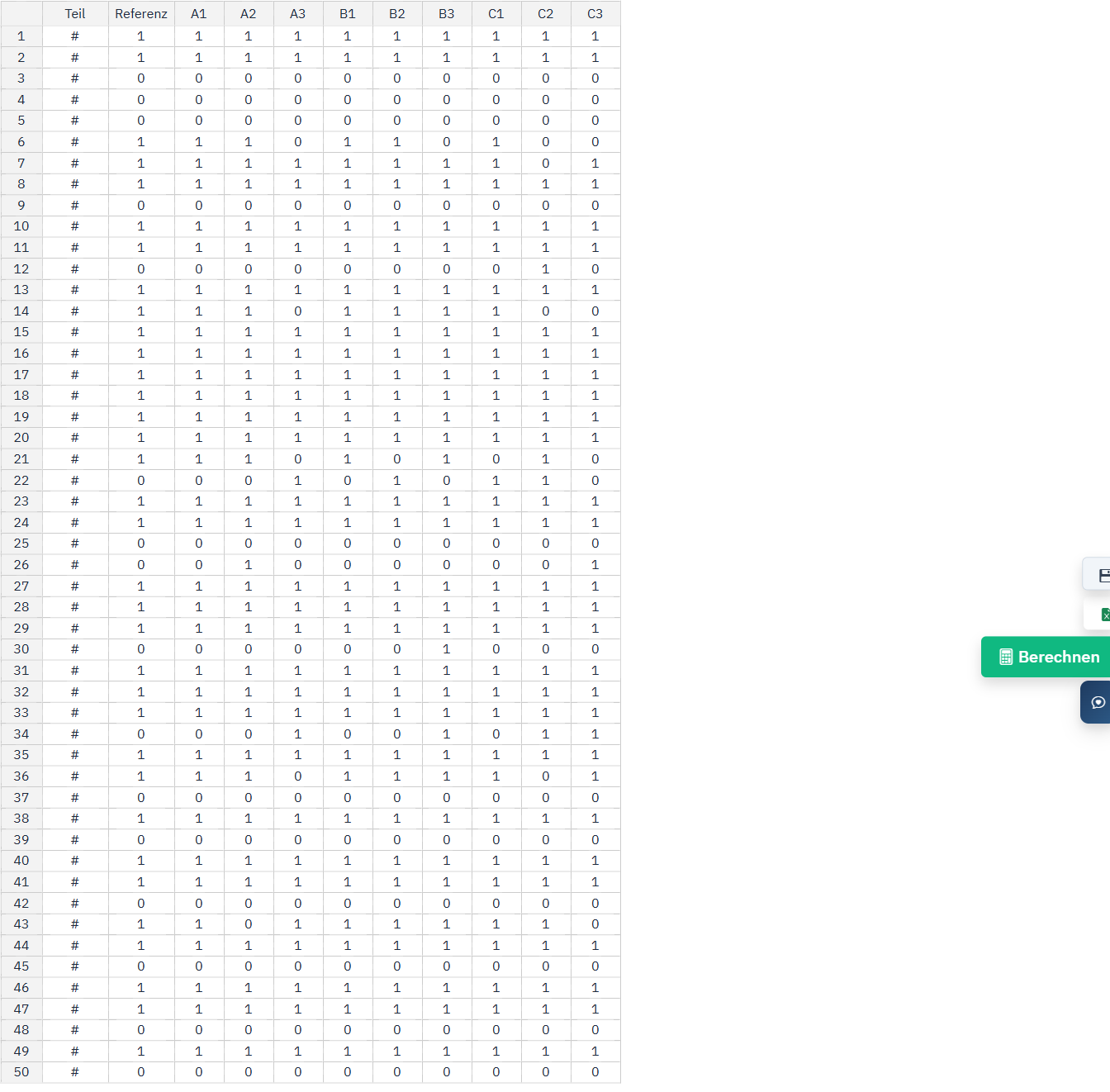
Data entry is performed via a table with the following structure:
- Rows: Parts (numbered or named)
- Columns: Inspectors x Runs (e.g. "Inspector A / Run 1", "Inspector A / Run 2", ...)
- Cell values: The selected assessment category
- Click on the desired cell.
- Select the assessment category from the dropdown list or enter the value directly.
- Navigate with
TaborEnterto the next cell.
Tip: If a reference assessment is available, enter it in the first column ("Reference"). The agreement of the inspectors with the reference is calculated automatically.
Info: You can also import input data via copy & paste from Excel. Make sure that the assessment categories match the defined categories exactly (case-sensitive).
Kappa Values
The central metrics of attributive MSA are the Kappa coefficients, which quantify the agreement between inspectors.
Cohen's Kappa
Cohen's Kappa measures the agreement between two inspectors (pairwise comparison) taking into account the randomly expected agreement.
Formula:
Kappa = (P_o - P_e) / (1 - P_e)
- P_o = Observed agreement (actual proportion of agreeing assessments)
- P_e = Expected random agreement
Cohen's Kappa is calculated separately for each inspector pair. In my8data, a complete Kappa matrix is displayed, in which each cell contains the Kappa value for a specific inspector pair.
Fleiss' Kappa
Fleiss' Kappa is an extension of Cohen's Kappa for more than two inspectors. It measures the overall agreement of all inspectors simultaneously.
Fleiss' Kappa is displayed in my8data as a single overall value and provides information on how well the inspectors agree overall.
Evaluation Scale
The interpretation of Kappa values follows the standard classification according to Landis & Koch (1977):
| Kappa Value | Strength of Agreement | Assessment |
|---|---|---|
| < 0.00 | Poor | Worse than chance. Fundamental problem with the inspection process. |
| 0.00 -- 0.20 | Slight | Minimal agreement. Inspection process unsuitable. |
| 0.21 -- 0.40 | Fair | Weak agreement. Significant improvements needed. |
| 0.41 -- 0.60 | Moderate | Moderate agreement. Improvements recommended. |
| 0.61 -- 0.80 | Substantial | Good agreement. Acceptable for many applications. |
| 0.81 -- 1.00 | Almost Perfect | Nearly perfect agreement. Excellent inspection process. |
Info: A Kappa value of 1.0 means perfect agreement. A value of 0 means that the agreement is no better than pure chance. Negative values indicate systematic inconsistency.
Important: In practice, a Kappa value of at least 0.75 is often required. In safety-critical areas (e.g. medical devices, aerospace), higher requirements may apply.
Agreement
In addition to Kappa values, my8data offers further analyses on inspector agreement.
Agreement Rates
my8data calculates various agreement rates:
| Metric | Description |
|---|---|
| Within Appraiser | How consistent is each individual inspector with themselves across the different runs? A high value shows that the inspector arrives at the same result when repeatedly assessing the same part. |
| Between Appraisers | How well do the inspectors agree with each other? Compares the assessments of all inspectors for each part. |
| Appraiser vs. Reference | How well does each inspector agree with the reference assessment? Shows the accuracy of each individual inspector. |
| All Appraisers vs. Reference | How well do all inspectors together agree with the reference? Only parts where all inspectors agree in all runs are counted. |
Decision Matrix (Confusion Matrix)
The decision matrix compares each inspector's assessments to the reference assessments:
| Reference: OK | Reference: NOK | |
|---|---|---|
| Inspector: OK | True Positive (correctly accepted) | False Positive (incorrectly accepted) |
| Inspector: NOK | False Negative (incorrectly rejected) | True Negative (correctly rejected) |
The following metrics are derived from the decision matrix:
| Metric | Formula | Description |
|---|---|---|
| Effectiveness | (True Positive + True Negative) / Total | Proportion of overall correct decisions |
| Miss Rate | False Positive / (True Negative + False Positive) | Proportion of defective parts incorrectly accepted |
| False Alarm Rate | False Negative / (True Positive + False Negative) | Proportion of good parts incorrectly rejected |
Warning: The Miss Rate is particularly critical as it indicates how many defective parts are passed as good. In safety-relevant areas, this rate must be as close to 0 as possible.
Tip: Analyze the decision matrix for each inspector individually. If a particular inspector has a noticeably high miss rate, they should receive targeted training. Also examine which parts show frequent errors -- often these are the borderline cases where the inspector decision is uncertain.
Presentation of Results
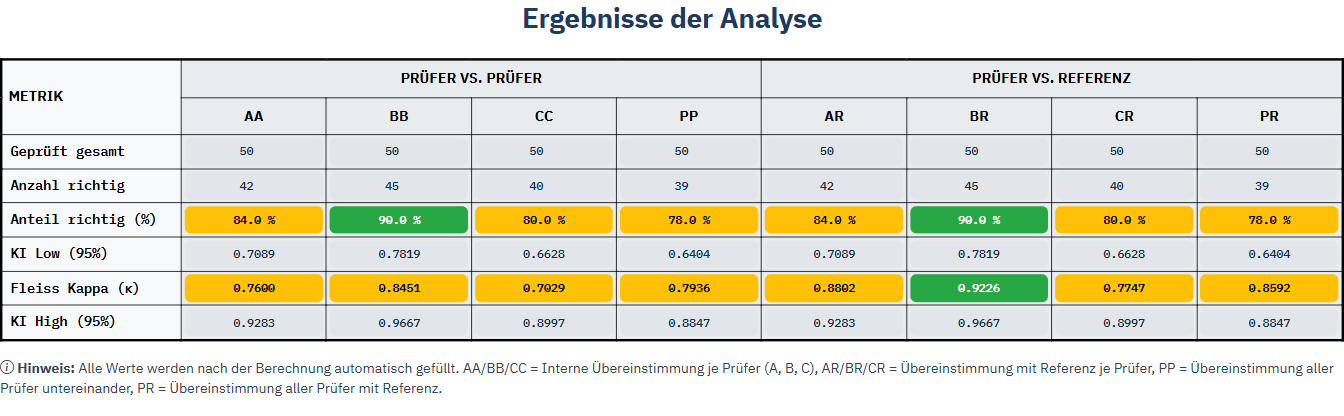
my8data presents the Kappa and agreement values as a color-coded results table (see section Evaluation Scale). Green, yellow, and red immediately indicate whether an inspector meets the acceptance thresholds.
The table summarizes all metrics compactly:
- Proportion correct (%) per inspector — internal (inspector vs. inspector) and against the reference
- Fleiss' Kappa (κ) with 95 % confidence interval
- Agreement between inspectors (PP) and with reference (PR)
Info: Method 7 does not generate separate diagrams -- the attributive assessment is completely represented via the color-coded results table.